About this Blog

This is a blog about the first (Modern), most played, longest running trading card game ever: Magic: The Gathering.
For this blog I would like to give back to the community and the trading card game that I have come to love and cherish.

Showing posts with label Tutorial. Show all posts

Friday, March 20, 2015

The Magic of Searching (Part 2): A Gatherer and MagicCards.Info Walkthrough

Walking Archive, Wizards of the Coast, Heather Hudson
Welcome to Part 2 of "The Magic of Searching" where I help you build skills that will help you find the cards that you're searching for.  Part 1 introduced how to cherry pick cards of keywords to use in your search.  In this article I plan on breaking down the Advanced sections of Gatherer and MagicCards.Info (MCI), explaining their uses and functions to further narrow down your parameters.  TCGPlayer was purposely left out as I found that it required exact wording for its searches making it essentially unusable as a search engine and therefore not recommended as a card search site.  As a price guide and card purchase site it has been good in my experience.

Disclaimer: This post leans a bit more heavily towards MCI for two reasons. One, I have used MCI more extensively and know the ins and outs better.  Two, I personally believe it is a better search engine than Gatherer (Again personal opinion)


MagicCards.Info


MagicCards.Info or MCI for short, is in my opinion one of the better, if not the best search engine for Magic cards.  It has extreme versatility, a clean template, and the ability to edit search parameters on the fly, especially if you know the syntax, which I will get you started on later.

The Basics

In addition to your search parameters there are several auxiliary things you can do to aid your search.  On MCI the first module you come across is the "Options" module which I almost always set to sort by converted mana cost (CMC).  This ensures that I get cards with the lowest cost for the effect(s) that I want.  Next are the "Name" "Rules Text" and "Types" modules.  These are fairly straightforward with "Name" searching for names, "Rules Text" searching Oracle text and types searching for types (Both card types like Artifact, Creature, etc and more specific types like "Treefolk" "Vampire" and "Elf")

Colors, Mana Cost, and Color Identities

"Colors" "Mana Cost" and "Color Identity" may look straightforward but in reality have subtler uses as well as some potential pitfalls.  The "Colors" module for example is simple and straightforward but can easily cut large swaths of potential cards from your results.

The first thing to notice is that "!Exclude Unselected" in the "Colors" module is selected by default.  This often means by not unchecking this box you will exclude: 1) Artifacts and other colorless cards 2) Lands (Also technically colorless) 3) Multicolor cards and hybrid cards.  Make sure to select or unselect this option respectively and/or include the options that you want to find in your search results.  For example selecting "White" and "Exclude Unselected" when searching for cards in a mono-white deck would eliminate cards like Rhys the RedeemedJudge's FamiliarBoros Recruit etc. that all have the possibility of being played in a mono-white deck.

Furthermore, "!Exclude Unselected" can interact with the "Require Multicolored" options in interesting ways.  For instance, keeping "!Exclude Unselected" checked while including "Require Mulicolored" with UBW selected will find only cards that have all three of the Esper colors in their mana costs.  On the other hand, unselecting "!Exclude Unselected" will open up a slew of other options that contain at least one of the colors selected but can contain other colors like Abrupt Decay.

The "Mana Cost" module is a less used but still useful tool that will help you search for specific mana costs.  For example entering "BBB" into it will find cards that cost exactly three black mana.  This can be useful for finding good black devotion cards or more efficient cards for your mono colored deck.  Finally, the "Mana Cost" module plays a crucial role in finding both X cost spells as well as hybrid mana symbols that will be discussed below.


Power, Toughness, CMC, and Loyalty


These are really self explanatory, power and toughness modules can be used to find creatures for AleshaDoran, or to trigger Ferocious.  The "Converted Mana Cost" (CMC) module is something you are sure to use often, capping mana costs to keep your curve efficient, or looking for Transmute targets.  The "Loyalty" module is something I don't often use but  you can use it to search up planeswalkers only with specific abilities etc.

Rarity and Format
Again, self explanatory.  "Rarity" can be used to limit your search to pauper cards or perhaps a cube draft.  "Format" will limit your search to cards that are only legal in their respective formats.  (Note: I've noticed that MCI lags a bit with Metal Worker still being listed as banned in Commander although it was unbanned around 5 months ago and Treasure Cruise still listed as "legal" in Modern although the ban announcement and implementation came into effect 21 and 17 days ago respectively (as of 2/9/2015).  Furthermore, it does not include the Duel Commander (1v1 or French) banlist at all).  Because of this I don't recommend using this module as it will often be outdated and the banlists can be looked up easily.


Is:
The "Is" module is one that, I admit I only rediscovered in the process of writing this article.  I looked at it before in the early days, and not understanding the terminology or significance, wrote it off as useless and hadn't gone back to it since.  Therein lies the tragedy.  I mean look at the sheer versatility of this module (On the left) that doesn't come as a "one of" but two of.  Because of this I just had to put it into a section by itself.

Special Types: This is one of the most useful categories.  It can limit your searches to either permanents or non-permanents.  Spells or non-spells (Non-spells essentially being lands).  You can search for split cards, flip cards, vanilla creatures (no rules text), and most important of all "Costs split mana" which means hybrid mana in this case (More to come on that).
Card Face/Border: This category is the "aesthetics" category, allowing you to search for "old" border and "new" border cards, future sight card frames, cards with black, white, and silver (Un-cards) borders and foils.  Essentially every possible option to pimp out your decks.
Cagegories: This module is another rather useful one enabling you to search exclusively for or eliminate the "Un-cards"  Find promo, reserved list, reprinted, and time-shifted cards.
Banned/Restricted: This is largely to find cards that are banned in multiple formats (Keep in mind that the banlist for MCI lags behind the official ban lists).

Card Text and Flavor Text:

"Card Text" refers to the wordings that were originally printed on the card.  This option searches almost the entire card including the name, type, and rules text.  Flavor text should be pretty obvious, searching the flavor text for the words you choose.

Edition and Type:


Finally there is the "Edition" and "Type" modules.  The "Edition" module is an effective tool you can you to search for cards in specific sets or blocks as well as another way to search for standard cards (In case the sets are not updated correctly).  The "Type" module is a very useful tool, one that I use often.  The "Type" module allows you to search for artifacts, creatures, enchantment, instants, lands, planeswalkers, and sorcieries.  Furthermore, it breaks down these categories into all the available types of cards.  For instance, selecting "Artifact - Equipment" would produce only equipment for your results.  Use "Shift" to select blocks of neighboring sets and "Control (Ctrl)" for multiple individual selections.

Now that we've covered the basics there a few more specific things that I'd like to cover.  Using the MCI syntax and wordings, searching for X spells, and hybrid mana.

Syntax
Some syntax you should be aware of when using MCI includes:
Quotations: Quotation marks around groups of words will include only cards with this exact phrase.  For instance, searching for "from a graveyard" in the Rules Text slot, will include only cards with the words "from a graveyard" in that order.
Minus Sign: Adding a minus sign in front of single words will exclude cards with those words from the results.  For example, including "-graveyard -hand" will exclude cards with "graveyard" and "hand" in them from your search.  This can be used for mass exclusion of undesired mechanics found in your initial search.  If for example you are searching for cards that copy spells (like Increasing Vengeance) you might want to include "-Cipher -Conspire" in your search in order to exclude all cards with those keywords.
Quotations and Or: Entering ["graveyard" or "hand"] as well as [graveyard or hand]into the rules text will give you cards that have "graveyard" and/or "hand" in their rules text.

X Marks the Spot

To find X cost spells you need to use the "Mana Cost" module.  For example Banefire and other red X cost spells can be found by inputting "X" into the module, specifying greater than or equal to (>=), and finally for the "Colors" module, check the color(s) you want to find (Depending on your goal, don't forget "Exclude Unselected" ).

Why are hybrids always stronger?

Hybrid mana is often hard to search for.  MCI enables you to search for cards with hybrid mana in several different ways.  The easiest way is to go down to the "Is:" module and select "Costs split mana"  Now you can go back up to "Colors" and select which colors you want to include.  If you're searching just for split mana costs that can be paid with blue remember to uncheck the "Exclude Unselected" check box.
A second method is to enter a hybrid mana symbol into the "Mana Cost" module (with ">=") to find all the cards that cost that particular hybrid mana.  For example "{W/U}" will find each card that can be paid with white or blue mana costs.
A third method is to search the "Card Text" or "Rules Text" using the hybrid mana symbols to search the card text/rules text for hybrid mana symbols.

Below I've included the notation for hybrid mana to help in the future.
  • Manawu.gif = {W/U} White or Blue
  • Manaub.gif = {U/B} Blue or Black
  • Manabr.gif = {B/R} Black or Red
  • Manarg.gif = {R/G} Red or Green
  • Managw.gif = {G/W} Green or White
  • Manawb.gif = {W/B} White or Black
  • Manaur.gif = {U/R} Blue or Red
  • Manabg.gif = {B/G} Black or Green
  • Manarw.gif = {R/W} Red or White
  • Managu.gif = {G/U} Green or Blue
  • Mana2w.png = {2/W} 2 Colorless or White
  • Mana2u.png = {2/U} 2 Colorless or Blue
  • Mana2b.png = {2/B} 2 Colorless or Black
  • Mana2r.png = {2/R} 2 Colorless or Red
  • Mana2g.png = {2/G} 2 Colorless or Green

Gatherer

Gatherer is the official search engine of Wizards of the Coast and is generally the favored search engine for many.  Gatherer sports an easier way to exclude words with a drop down menu.  It also separates words out with the "Add" keys included with every parameter and includes a drop down of all possible options.

The Basics of Gatherer

Name, Rules Text, and Expansion are self-explanatory.  Gatherer has the plus of allowing you to use the "not" and "or" functions easily.  Remember to add the parameters to the search criteria to include them.

Format, Colors, Types, and Subtypes are also self-explanatory.  For colors there is an additional drop down where you can limit the results to selected colors, multicolored, and more significantly a "Playable with only these colors" restriction that restricts your results to cards that are playable only to the colors that you choose.  This can be quite useful for hybrid cards and other multicolor cards in Standard, Modern, Legacy and Vintage formats when trying to stick to certain colors.
Keep in mind "Types" refers only to major types like "artifact" "creature" etc. while the "Subtypes" module is the one used for subtypes like "Vampire" and "Equipment" The additional drop down for Subtypes includes an "Exclude Unselected Terms" option.

Converted Mana Cost (CMC), Power, Toughness, and Flavor Text: All modules that are again self-explanatory.  Gatherer provides allows for greater than or equal to options in the drop downs as well as the usual "and/or/not" options.

Mark: Refers to the watermark of the various Guilds and Clans.  Only cards with these watermarks will be displayed in your results.  Additionally there is the option to exclude certain watermarks.

Artist: Is the artist who created the artwork for the card.

User Comment, User Name, and Community Rating all are indicative of the comments and ratings given by users who use Gatherer.  However, keep in mind that currently the comments sections are locked on all Gatherer card pages and thus new and additional comments for recent sets have no comments at all. (From what I hear this was due to an update to Gatherer that broke them)

Mana Cost: This is similar to the Magiccards.Info module.  It doesn't use a greater or less than symbol and instead opts for an approximate symbol which will search for cards that include those mana costs.  This is an additional way to search for hybrid mana costs by using the syntax above.  It should be noted that Gatherer does not search for exact mana costs when searching in the "Mana Cost" bar like MagicCards.Info does so there is less need to be specific here.

Block: Rather than set, this module will search through cards in specific blocks and find cards only in those blocks.

Rarity: This module will allow you to search for commons, uncommons etc for things like pauper.  Additionally there are "Promo" and "Bonus" options which allows you to find promo/alternate art cards and "Bonus" cards (Which seems to apply to Magic Online things like Vintage Masters).

Hand Modifier/Life Modifier: This refers to an official game mode/format called Vanguard where Vanguard cards have special effects as well as modify your hand and life totals.


X Spells in Gatherer

Searching up X spells in Gatherer is essentially the same as in MCI.  XG will find you all the cards with XG as their mana cost, while adding the approximate symbol to the syntax will find you all cards with X and G in their mana costs.

Hybrid Spells in Gatherer

Unfortunately, in Gatherer searching for hybrid mana is a bit more complicated.  Currently the only way I know how to search for hybrid mana is to use this "m/\(R\/G\)/" syntax in the "Mana Cost" module.  In this instance I am searching for red/green mana symbols in the mana costs of cards.  For hybrid mana symbols in the cards themselves (like activated ability costs etc.) type "R/G" into the "Rules Text" module for red/green hybrid mana symbols.  When searching for other hybrid mana symbols, use the above chart when ordering your colors.  For example, m/\(B\/G\)/ and B/G for black/green hybrid mana symbols will yield results but m/\(G\/B\)/ and G/B will not.  It should be noted that Gatherer does not search for exact mana costs when searching in the "Mana Cost" bar like MagicCards.Info does so there is less need to be specific here.

Pros and Cons (MCI vs Gatherer)

MagicCards.Info

Pros:
Cleaner Template/Layout
Displays Low/Mid/High prices from TCGPlayer (with links)
Allows easy switching between sets and printings
Allows easy switching between languages.
"Is:" module allows for vast possibilities.

Cons:
Must know/use syntax to subtract out results
Must "keep/go back to" the original search page or know syntax to subtract out search terms.
Relies partially on volunteers/users etc.

Gatherer:

Pros:
Not/Or Functions Built in (Easier to exclude terms)
Drop down of possible search terms
Comments/Rating (Indefinitely Disabled)
Is updated first (being WotC's search engine)

Cons:
Doesn't fully display syntax (Tap symbols "{Q}" etc)
Harder to find Hybrid mana symbols
More complex advanced syntax (Personal Opinion)
Longer Load Time

Thanks for reading,
Sincerely, MTW

Acknowledgements

This article was made possible by: (Alphabetically)
Chris "CJ" LaJeunesse
David Connor
Nikolaus Steven Bonnay
Spencer Alexander
Stephen Jones
Those of you at MTG COMMANDER for your feedback, input, and votes.



Friday, January 23, 2015

The Magic of Searching (Part 1): Keywords


Hapless Researcher, Wizards of the Coast, Ron Spears
Searching through the vast arsenal that is the Magic card pool can be a daunting task.  This is a skill that I feel many, even experienced players, have trouble with, especially with the finer aspects of searching.  Granted the fact that there are currently over 13,000 Magic cards with hundreds more being added every block makes this difficult.

In this article, I am going to get you started on recognizing keywords as well as walk you through a few different resources that you can use to find the cards you need.  I have decided to use Gatherer and MagicCards.Info (MC.I for short) to search for my examples as a poll of over 90 people listed these two as their top search engines.  In my research, I quickly realized that TCGPlayer, the third most popular search engine, does not allow you to use cherry picked keywords.  Instead, it requires unbroken text which, makes looking for similar cards very difficult and restrictive.  As such, I do not recommend using TCGPlayer as a search engine for cards.  As a pricing guide (mid-price) and ordering site, it is an excellent resource.

The Magic of Searching


One of the first initial steps towards successful card searching is looking up cards you come across that you haven't heard of or don't recall.  This not only expands the number of cards you know about to put in decks but also familiarizes you with additional terminology and rules text that you can use in future card searches.

Choosing Keywords 

Choosing which words to include in your search is crucial to card searching.  A single word added or excluded can result in a difference of hundreds of cards.  Good keywords are words that WotC uses frequently.  Words like "graveyard" "hand" "exile" "battlefield" etc. are examples of commonly used terms.   A full glossary of terms is available here under "Comprehensive Rules."  There are several important things to remember when choosing keywords:

Remove specific references such as names, numbers, etc


Often times, cards refer to themselves, cite specific numbers, costs or other drawbacks for balance purposes.  These need to be removed, as they will limit your search results, often by a large margin. Let's use Haunted Fengraf as an example, looking for creature recursion.


First, it is best to look at the full syntax of Haunted Fengraf's rules text first:
{T}: Add {1} to your mana pool.
{3}, {T}, Sacrifice Haunted Fengraf: Return a creature card at random from your graveyard to your hand.
Notice a few things:
The tap symbol "{T}"
The colorless mana symbol "{3}"
The colon ":" marking the ending of the cost for the activated ability and the beginning of the effect.

Now, Haunted Fengraf has a few rather specific wordings that we need to remove.  Most obvious is the name, which would limit our results to exactly one.  Then, there are the tap and colorless mana costs that are unnecessary and too specific for our search.  We also want to remove the keyword "sacrifice" this time because it will narrow down the results only to those cards that sacrifice themselves or other permanents.  The mana producing ability also needs to be removed, as it is specific to this card.  The keyword "random" is an example of a drawback/balance added to the card.  This word should be removed, as returning a specific creature card from our graveyard to hand is much more beneficial.

Ideally the keywords we want are "return" "creature" "your" "graveyard" "hand" 

Notice that because I wanted cards with effects specifically similar Haunted Fengraf I included the narrower keywords "your" and "hand" These keywords eliminated cards that reanimated creatures from both your graveyard and other player's graveyards.  The keyword "your" restricts our search to your graveyard and the keyword "hand" eliminates reanimator cards.

You, Y'all, and You all


A very important thing I learned while searching for cards is the distinction between searching for the keywords "target player" "target opponent" "each player" and "each opponent"  Each of these combinations is unique, giving specific kinds of cards in your search.  Another crucial distinction is searching for cards that are targeted effects and global effects: "target" (player, opponent, artifact, enchantment etc) and "all" (artifacts, enchantments, etc).  Adding any of these terms into your search parameters can heavily influence the kinds of cards you find in your results.  Now, if you want to cast a wide net these kinds of terms will eliminate an entire category of cards.  However, on the other hand, if you are looking specifically for let's say global effects these terms can narrow down your search and save time.

Beasts and little things 


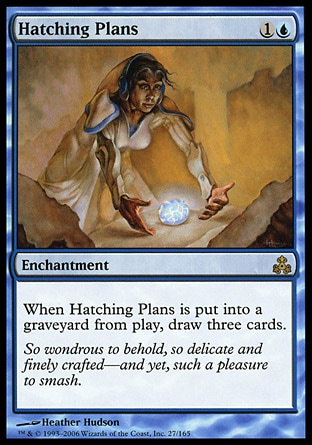
Another important distinction is the difference between wording for creatures and non-creatures being "put in the graveyard from play" Creatures use "dies" rather than the term "put in the graveyard from play" that non-creatures use.  Despite this difference in wording, "dies" by definition is "put in the graveyard from play" only it applies to creatures.  Here are two examples of the differences between creatures and non-creatures being put into the graveyard from play: Child of Alara and Hatching Plans


Cherry Picking Keywords


Often my first initial step to card searching is starting with a card that has effects similar to what I want to find.  This by far is one of the easiest places to begin.  As an example I have chosen the "Mill" mechanic as it currently does not have a easily searchable keyword yet is a significant enough mechanic to see printing in almost every set.
Millstone is where the the informal term "Mill" comes
from as it was the first card to feature the mechanic.
Again I want us to look at the full syntax of Millstone's rules text first:

{2}, {T}: Target player puts the top two cards of his or her library into his or her graveyard.

The initial keywords I take from here are "put" "top" "card" "library" "graveyard"  I have chosen these keywords to maximize the number of possibilities so as to not exclude or miss cards.  As you become more experienced searching for cards, you will know what keywords to include to narrow the initial list but for now I recommend casting a wide net.

Notice two things with the keywords I chose for this search:
1) I used "card" rather than "cards"  This is because although it may not seem like much of a change.  "Cards" is actually much more specific, most prominently eliminating cards that mill a single card at a time.  Such cards can be beneficial in let's say a Sidisi, Blood Tyrant Commander deck that wants to mill cards individually rather than whole swaths of them.
2) In my opening search I did not include the word "player"  In this instance I wanted to include all mill effects.  Keywords involving players come in two forms: "Player" and "Opponent"

Now entering "put" "top" "card" "library" into MC.I and Gatherer you come up with 287 and 288 results respectively.  Because we are casting a wide net, there are many cards that specifically are not mill cards.

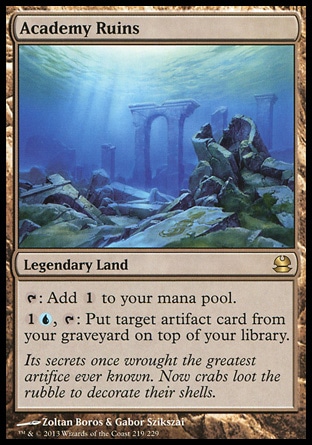
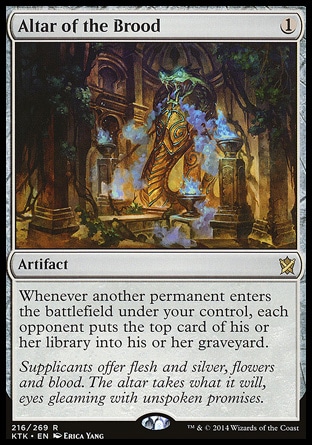
Our next step is to narrow down the number of cards.  The first two cards that come up in both search engines are Academy RuinsAltar of Dementia, and Altar of the Brood


Again, here is the full syntax:
Academy Ruins
{T}: Add {1} to your mana pool.
{1}{U}, {T}: Put target artifact card from your graveyard on top of your library.
Altar of Dementia
Sacrifice a creature: Target player puts a number of cards equal to the sacrificed creature's power from the top of his or her library into his or her graveyard.
Altar of the Brood
Whenever another permanent enters the battlefield under your control, each opponent puts the top card of his or her library into his or her graveyard.
By comparing these cards: one we don't want (Academy Ruins) and two that we do want (Altar of Dementia/Altar of the Brood) we can add additional parameters to our search to further narrow down the pool of cards.

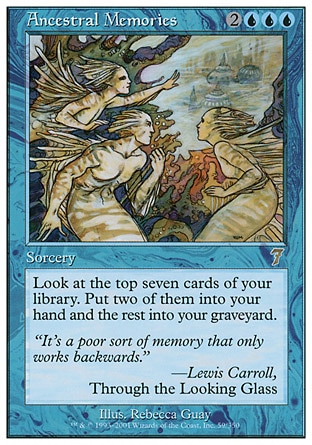
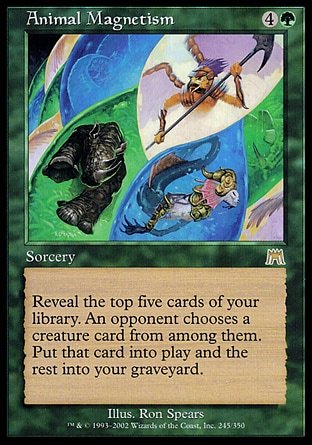
Now, some additional search parameters we can add are "his or her" and "into" as these two terms are shared by cards that we want and are in common with other mill cards.  This reduces the card pool to 254 cards, a small reduction.  Clearly, there are other search parameters we can add.  Again scanning the first page of our first update, I notice Ancestral Memories and Animal Magnetism


Ancestral Memories
Look at the top seven cards of your library. Put two of them into your hand and the rest into your graveyard.
Animal Magnetism
Reveal the top five cards of your library. An opponent chooses a creature card from among them. Put that card onto the battlefield and the rest into your graveyard.

Now, since there are several different types of mill (Self-Mill, 1v1 Mill, Opponent(s) Mill and Global Mill) there are several different directions to go.  For instance, self-mill would generally want to find cards that target a single player, each player, or have wordings similar to those above.  A deck using mill as a win con would on the other hand prefer spells targeting a single player or opponent(s), cards like Millstone and Mind Grind  A deck that wants to take cards from everyone's graveyard (with cards like Teneb, the Harvester and Reanimate) would choose cards that contain "each player" instead like Ghoulcaller's Bell.  By using these more specific terms, we can narrow down the pool list to the things that we want.

Rules? We don't need no stinkin' rules!


Finally, looking up cards you don't know, exploring different kinds of situations and meanings, these kinds things I also encourage you do with the comprehensive rules.  If you come across a situation that you're not sure of or you think of a particularly interesting interaction that might require a ruling, look them up.  It will help you grow in your knowledge and understanding of the game.

Part 2


It became increasingly apparent as I wrote this article that it was going to be a long one if I was going into the detail that I wanted to go into.  As such, I have broken this article up into two parts, the second of which I will complete at a later date.  In part 2, I will go into the specifics of searching for X spells, hybrid mana symbols and the specific uses of each of the functions on Gatherer and MagicCards.Info.  Part 2 will be available (here) when I finish it.

Thanks for reading,
Sincerely, MTW

Acknowledgements

This article was made possible by: (Alphabetically)
Chris "CJ" LaJeunesse
David Connor
Nikolaus Steven Bonnay
Stephen Jones
Those of you at MTG COMMANDER for your feedback, input, and votes.